
Purpose of This Page
This page outlines the end-to-end onboarding process for Scenario Planner within Alli.
It explains:
-
What happens after you confirm interest
-
What inputs are required
-
What you can expect at each stage
-
When you will be ready to actively run scenarios
Once you complete these steps, you will have a fully configured Scenario Planner model and will be able to run scenarios for your customer as frequently as needed to support ongoing planning and budget decisions independently.
End-to-End Onboarding Flow
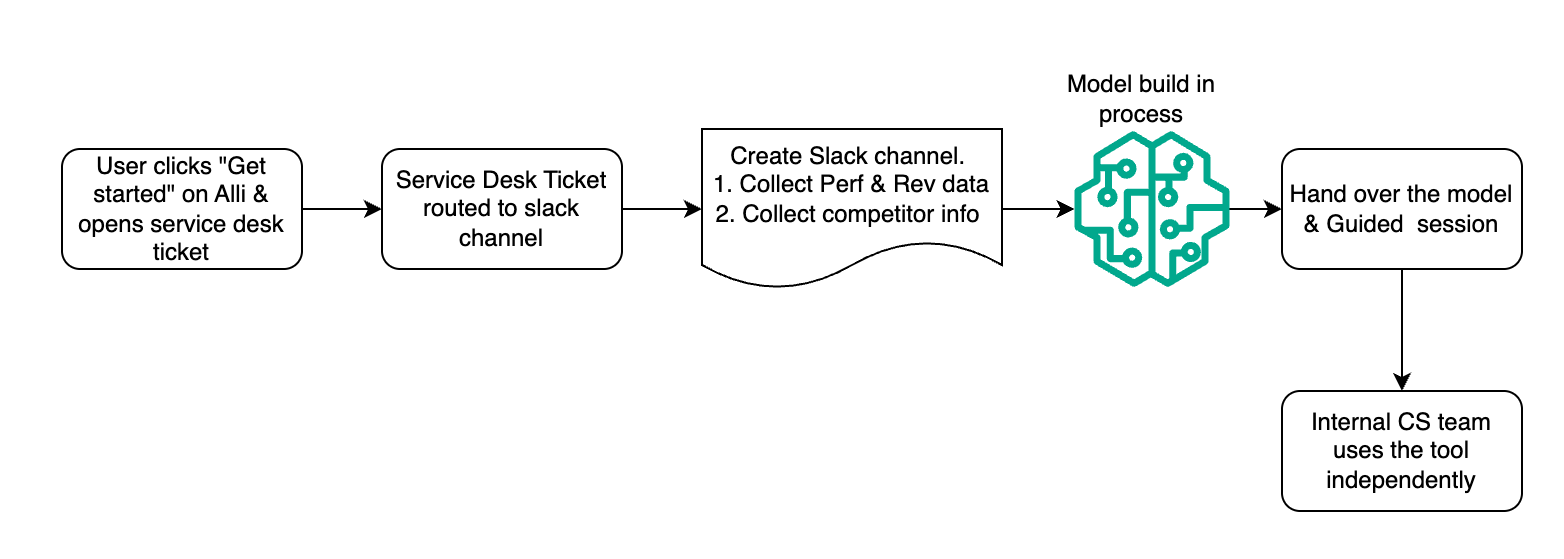
Detailed Process Breakdown
1. Client Identified
Objective: Confirm formal interest in Scenario Planner and initiate onboarding.
This step begins when:
-
A customer sees the NULL state experience on Scenario planner. They are interested in using the tool and click “Get Started” on page below.
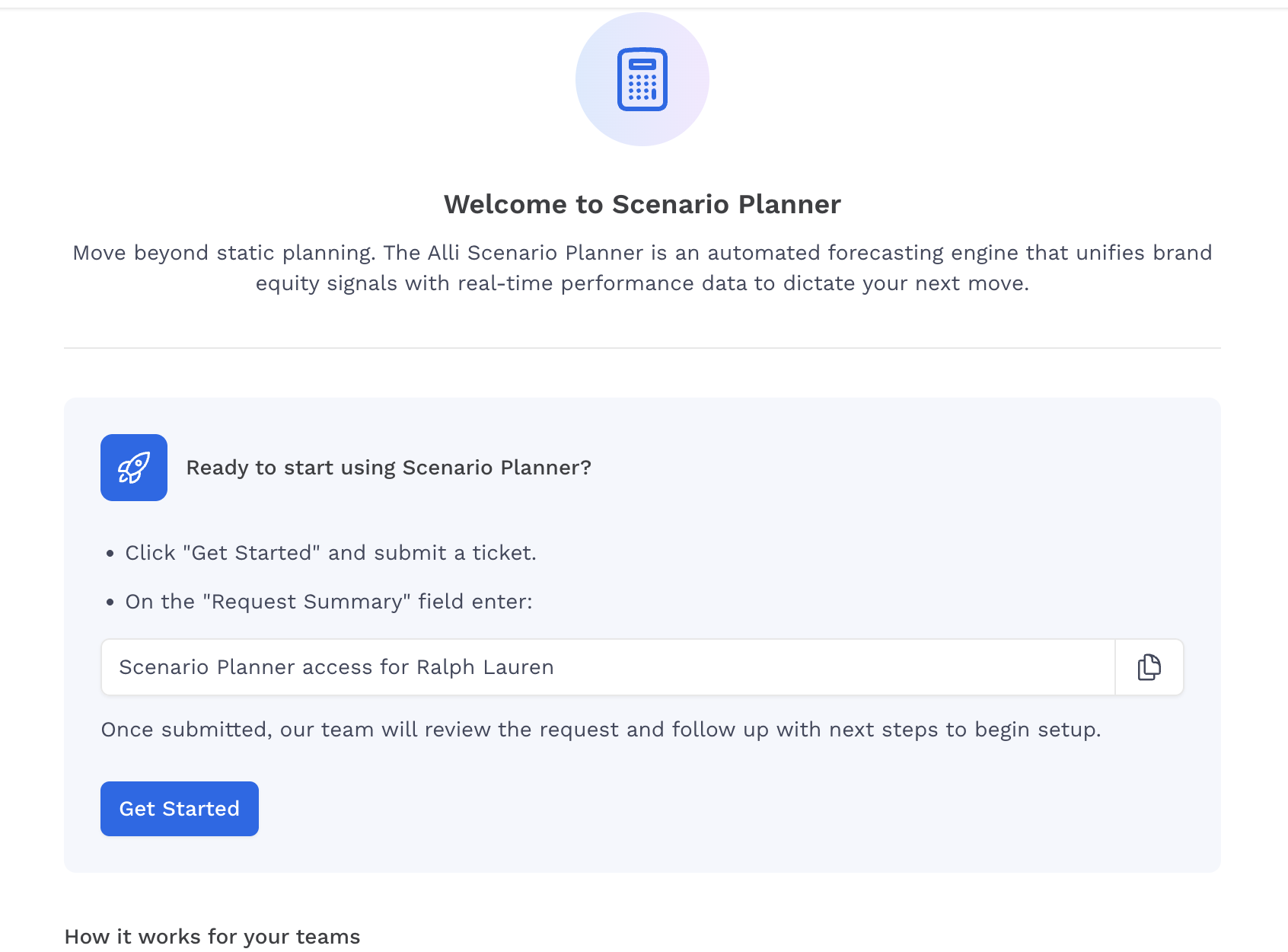
NOTE: Anyone accessing this page UNTIL the model is created WILL see the same page.
Mitigation Note
The persistent “Get Started” button is not a concern during the beta period. Scenario Planner access is controlled through the service ticket process, and this experience is temporary while we are in beta.
Additionally, a dedicated Slack channel has been created for Scenario Planner discussions. Any new user who submits a ticket can be quickly added to the channel by the product team, ensuring proper onboarding and communication.
-
The link navigates to Service Desk and customer opens a ticket.
-
The Ticket sends a notification to Uma Killedar AND to “#media-planner-devs” channel
-
Product will open a temp slack channel with a link to help documentation
2. Intro & Alignment
Objective: Confirm fit, align on goals, and outline data requirements
What happens:
-
Focused demo tailored to customers' planning needs
-
Confirmation of primary point of contact and the user of scenario planner tool
-
Customer team to include all the relevant users in the slack channel.
-
Users include representative from following teams - analytics , client strategy and anyone else who is responsible for planning and optimization between channels/ platforms.
-
Alignment on Data Input & Validation
Objective: Confirm the data, KPI, and required setup inputs for your Scenario Planner model are as per Requirements
Required Actions
-
A temporary Slack channel will be created for onboarding communication (if not already created).
-
Customer internal team fills brand equity onboarding template
-
Make a copy and share with scenario planner team
-
Outcome:
Completed onboarding spreadsheet, active Slack channel, and aligned data inputs ready for model setup.
Scenario planner team has a good understanding of customer data to be used for planning
3. Model Setup & Backend review
Objective: Configure a calibrated Scenario Planner model specific to your business.
What happens:
-
We create a model
-
Backtesting
-
Establish weekly refresh cycle
Deliverable:
-
Calibrated model aligned to historical performance patterns
4. Model Ready Communication
Objective: Transition from setup to active usage.
You will receive:
-
Confirmation that the model is live on slack
-
Summary of assumptions and configuration
-
Suggested times for Guided First Use session
Deliverable:
-
Scheduled activation session
5. Guided First Use Session
Objective: Complete your first live scenario and interpret outputs.
During this session:
-
Walkthrough of Scenario Planner interface
-
Live simulation of 1–2 budget scenarios
-
Review of projected revenue impact
-
Export of scenario output for planning discussions
-
Discussion of integration into workflow
Deliverable:
-
Completed scenario
-
Clear understanding of how to interpret results
-
Agreed next steps
6. Independent Usage
Objective: Transition from guided activation to recurring usage.
You will:
-
Run new scenarios based on planning needs
-
Compare budget allocations
-
Incorporate outputs into optimization discussions
-
Use exports for client or executive meetings
Deliverable:
-
First independent scenario run
-
Documented use in a planning conversation
7. Workflow Integration
Objective: Institutionalize Scenario Planner into your planning cadence.
Common integration patterns:
-
Weekly channel optimization meetings
-
Monthly reallocation reviews
-
Quarterly planning cycles
Success state:
-
Scenario Planner is used proactively
-
Outputs support revenue-focused decision-making
-
Regular refresh cycle aligned to your planning rhythm
Roles & Responsibilities
Your Team:
-
Provide required data inputs
-
Attend Guided First Use session
-
Identify where Scenario Planner fits in planning cadence
Scenario Planner Team:
-
Validate and configure data
-
Build and calibrate model
-
Facilitate first-use activation
-
Provide ongoing support