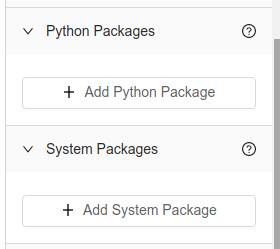
External Package Dependencies
Definition
Every language that Alli Workflow supports has packages that can be installed to enhance the functionality and simplicity of your scripts. If your script uses an external package, you'll have to tell Alli Workflow what packages to install before the script can run successfully.
There are 2 options in the platform for installing packages. How you enter this information varies by language.
If you're uploading code directly to Alli Workflow, we recommend installing packages using the Packages Panel so that team members can quickly view and change the version.
If you're using a Git connection, we recommend including a packages file in the root directory of your repository. Alli Workflow will automatically find this file and install dependencies.
You must choose one option or the other. Using both simultaneously will result in packages not being installed properly.
Setup
Option 1 - Use the Packages Panel
Python
Click to expand...
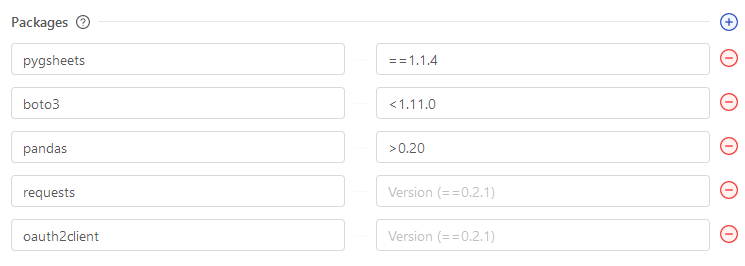
When you build a Task or Template with Python, it comes with the latest version of pip pre-installed, allowing you to easily install python package dependencies. These packages can be listed out under the Python Packages Panel.
Packages should be formatted with the Package Name field filled out. Optionally, you can include a version for each package name that you've listed. Versions must be formatted according to Python standards.
In order to install public packages from GitHub (that are not available on PyPi, or for different versions) you will need to use the git+git scheme with the GitHub URL.
git+git://github.com/pandas-dev/pandas@master
Bash
Click to expand...
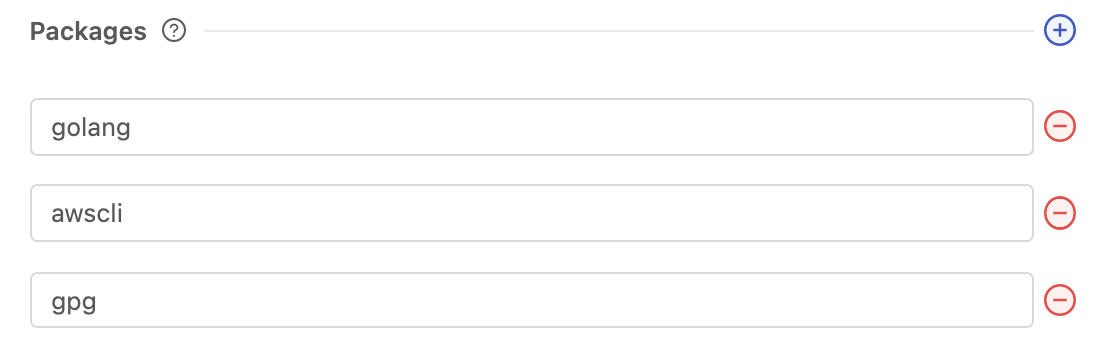
When you build a Task or Template with Bash, it runs inside Docker containers running a Debian image. In order for your Task to run successfully, you must provide a way to install any Linux packages that you need. These packages can be listed out under the Bash Packages Panel.
Packages should be formatted with the Package Name field filled out. Use this site to find all available packages you can use with Bash in Alli Workflows.
Node
Option 2 - Uploading a Packages File
Python
Bash
Node
Additional Notes
-
Because Tasks are containerized, the packages you install will only be available for that Task.
System Package Dependencies
Definition
For Python and Node Tasks, in addition to the language packages that are available in each, you may also install additional low level "system packages" for use by your code. With Alli Workflow’s current setup, these must be Debian Packages. These packages are installed using apt-get and get installed before language package. Typically, these only need to be included if they are a dependency for a language package you need to install.
Because Tasks are containerized, the System packages you install will only be available for that Vessel.
Screenshots